







A person is sitting in front of a laptop displaying a map of Germany, using the autocomplete function on SmartMaps to enter an address.
Image
Logo of the reference reifen.com.
Logo of the reference Postbank.
Logo of the reference comdirect.
Logo of the reference Hansgrohe.
Logo of the reference S-Communication Services.

Autocomplete

Intelligent input support for best address quality


All it takes to impress your customers with our autocomplete function is to enter a few letters. As soon as you enter the first letters, the system always returns suitable suggestions for your address search. Each successive input dynamically updates the results enabling you to find the address you are looking for quickly and easily. You can customize the autocomplete to suit different scenarios thanks to the wide range of built-in options, regardless of whether you are looking to search for addresses, validate addresses or autocomplete addresses in a checkout process.

Numerous well-known customers trust our services.

Icon of a rocket for the Boosting function with SmartMaps.

Boosting
Use the automatic boost function to find suggestions faster.

Icon of a location marker inside a circle for filtering results to a specified area.

Geometry
Filter the results to a rectangle or a specified radius only.

Icon of a rectangle with four arrows pointing inward, for restricting the autocomplete function to specific areas.

Local
Restrict the autocomplete to specific countries, regions or address types such as points-of-interest (POIs).

Lead your customers to their destinations quickly

Just a few characters to get to the correct address


The SmartMaps autocomplete function supports your users with a variety of filter options for address inputs. But don’t take our word for it, test it yourself now.

Quick and easy integration

Integrate it into your existing system with no effort
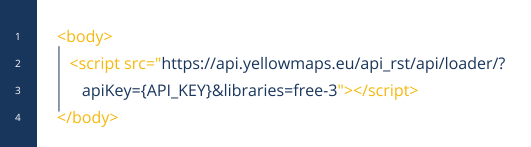

No elaborate adjustments are necessary to integrate SmartMaps into your existing system architecture. We will send you an individual API key, which you can use to seamlessly integrate autocomplete into your existing application. For more information and to get a better idea of the functionality of autocomplete take a look at our comprehensive documentation now.
Documentation
Code example for integrating a SmartMaps API key into an existing system environment.

Let's unlock your mapping potential together

Your success is our priority - Connect with us now


Have questions or seeking personalized guidance on our SmartMaps platform? I'm here to help. Contact me today for expert advice and support in achieving your goals with our cutting-edge mapping solutions.

Image

Christopher Schmitt
Maps-Specialist
Tel.: +49 721 9638-125
geosolutions@yellowmap.de